Food Journal Day 6: App Fail

To correctly track my food portions in Carb Masters, I need to key in the following data for my foods. Not very helpful at all!

To correctly track my food portions in Carb Masters, I need to key in the following data for my foods. Not very helpful at all!

While I’ve tracked my food for the last six days, today seems like a real tracking day.  Thanks to the dental work, I was severely limited in the types of food I ate. Today is the first day I can eat normally.

I’m only half way through the day and all I can say is the Carb Master app is annoying as hell.

I love that it provides a net carb count. However, the food library, while large, doesn’t allow me to select my portion size. Example – today I ate 1/2 C of chopped cucumbers for a morning snack. The app provides pre-designated portions and 1/2 C is not an option. The solution, I created a customer food called “Chopped Cucumber” but I had to key in the data (Net Carbs, Calories, Fat, Saturated Fat, Protein, Sugars, Fiber, etc.).

I ended up asking The Google the nutrition info for 1/2 C of cucumbers and keyed those numbers into the app.

Really? The whole point of mobile apps is convenience.  It ended up taking about 15 minutes to key in everything (damn you auto correct!).

It took less than 1 minute to record my food in my Weight Watchers app. The food journal in My Fitness Pal got the job done easily enough. Hell, writing it down in my Fit Book took less time…just sayin’.

Adding a favorite recipe into Carb Master? Well you can name the recipe and the ingredient.  How much of an ingredient and how it’s prepared? Not so much. Ugh!

The carb count changes if you eat a vegetable raw, steamed, or grilled.  Yet, I can’t key in how to prepare those vegetables in a carb counting app. It’s almost as if the folks who created this app don’t know anything about low carb eating.

Carb Master is an epic fail.

Searching For That Perfect App

Lose It!

Currently testing the Lose It app.

I’ve been searching for a nice weight loss tracking app. I’ve been very happy with my Weight Watchers app, but i would like it to do more to help keep me on track. I can’t use it to log my workouts. I can’t build recipes with it or move ingredients from the recipes the app does contain over to the app’s grocery list function.

So for the last couple of months I’ve been test driving different apps. I have yet to find one that can dethrone WW. However, the one I’m trying now – Lose It – is giving WW a run for its money. I’ll have a review up in the next few days.

However, I just need to vent about one thing consistent with the apps I’ve played with so far.

If you are building a weight loss app and program it to track carbs, then you better show me NET carbs (total carb count minus fiber)! This is far more important to me than total carbs.

If your app can’t do that, then you should not market that it tracks carbs. Or you should at least let those of us going low-carb know that you don’t track net carbs.

Now you may ask yourself, “Hey Dottotrot, why don’t you just use a carb counter like Atkins to track net carbs?” I have and it sucks. Plus, I don’t want to have to use a special app just to track net carbs. I’m looking for something easy to use where I can do ALL of my weight loss tracking. Now build it!

Rant is over.


Getting My Daily Water (or, how I stopped worrying & learned to love the SodaStream)

sodastreamOur SodaStream arrived last week. I love it.

I’ve been spending about $11.45 a week on carbonated water. The SodaStream should more than pay for itself within two months. Awesome.

“But why spend the money in the first place?” you ask.

I use to be a major soda drinker. Not diet soda. Regular. Coke was my choice drink. By the time I stopped drinking colas, I was probably drinking 5 12-ounce cans a day. Yikes!

I’ve tried cutting back before, replacing Coke with water. But while I love my tap water, I had a hard time drinking enough water in a day. I even tried to make my water more exciting – adding lemon, lime or orange slices. I still couldn’t drink more than 4 8-ounce glasses a day.

It wasn’t the caffeine that I craved. It was the carbonation. I loved the mouth feel of the bubbles. The sound of the fizz hitting the ice in my glass was music to my ears. I loved the sensation when the bubbles went down my throat.

Thankfully I discovered black cheery carbonated water. I love cherry flavored anything. It had no sugar and no carbs. When I got home, I gave it a try. Yes, as I opened the bottle it did explode and soak my shirt, but it was sooo tasty. From that moment I was sold. I was able to quickly eliminate soda from my daily routine. For what little caffeine cravings I have, my home made ice tea can accommodate me.

For nearly a year, my daily water intake is split between tap water, carbonated water and ice tea. It’s roughly a 45/45/10 split. As great as it’s been, it has taken a toll on the wallet.

A couple of our friends had a SodaStream and swore by it. I have to say I was skeptical. I’ve seen the ads and have tasted sodas from earlier versions or knock offs. They were horrible. But or friends who we trust swore by it and issued their own Pepsi Challenge. I had to admit that the small sip I had was very good. I was surprised it came from their machine. So we bit the bullet and decided to get one. We’ve only had it a few days, but it is one of the best purchases we’ve made. Doing the math, I’m now saving $50/month. My husband gets his diet Dr. Pepper taste for under $0.20 a glass.

I’m keeping to my 45/45/10 split and saving money to boot! What more could you ask for?


Loving My Weight Watchers eTools & Mobile App

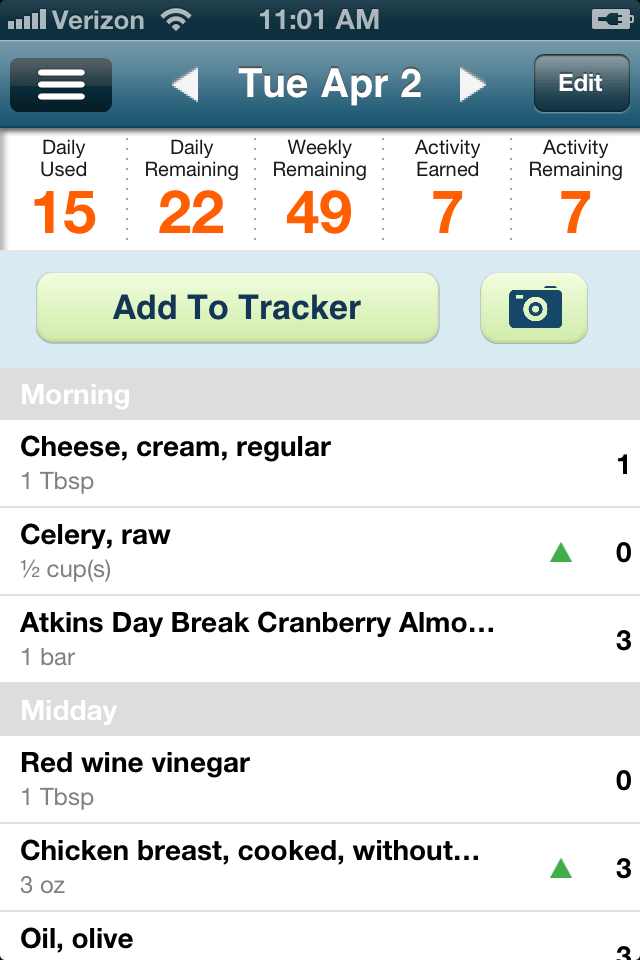
Weight Watchers' food tracker via mobile app.

Weight Watchers’ food tracker via mobile app.

I’ve been playing with my Weight Watchers mobile app and eTools website. Here are my initial thoughts.

I have to say I’m enjoying using them. They really do a great job at making it easy for me to find the points value of foods when I’m on the go. The food tracker is very nice. Its library of foods is excellent and does the calculations for you. Not a whole lot of typing like other tracking apps. It also does a very nice job of storing foods I put in – I can recall them very easily.

There is also a spot to track my activities and the intensity. With Weight Watchers, you can earn activity points for working out. Those points can be turned into food points for the day – something I don’t do. But I do like that I can track my activities. I just wish the activity tracker could do more. I love my MapMyWalks app. I can actually see the progress. Now Weight Watchers has rolled out ActiveLink which closely monitors your activities. There is a $5 monthly fee plus the cost of the device. I haven’t signed up. I tend to skip the first generation of these types of roll outs to get all the bugs out. Plus I’d like to hear from other WW members using ActiveLink to see if it is worth it.

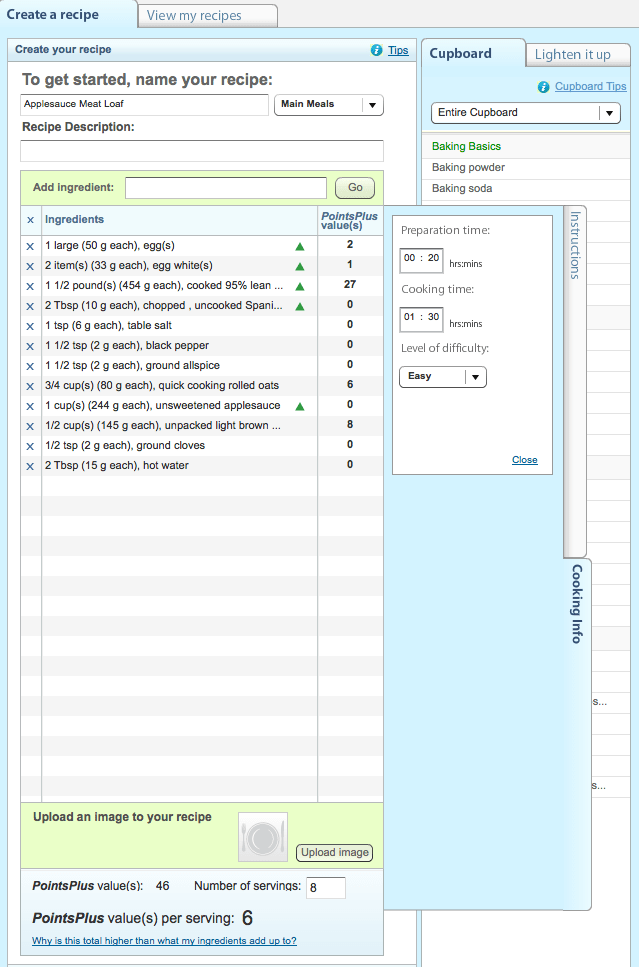
Dot to Trot's applesauce meatloaf recipe - 6 points per serving!

Dot to Trot’s applesauce meatloaf recipe – 6 points per serving!

This morning on eTools I tested their recipe builder. I keyed in just a couple of my standard meals I make weekly. The points are calculated for me. Awesome! I would suggest that WW look into creating shopping lists from the recipes. Since there are a few meals I make regularly, and I plan out our menu for the entire week, it would be great if I could just click on the recipes and poof – instant grocery list. So please get on that now!

One minor hitch with the recipe builder – it’s buried. I went the the recipe section at first and found lots of nice recipes and good info from Hungry Girl. I finally found it under My Tools area. I think an easy to find link in the general recipe section would be nice. It might be there, but I didn’t see it.

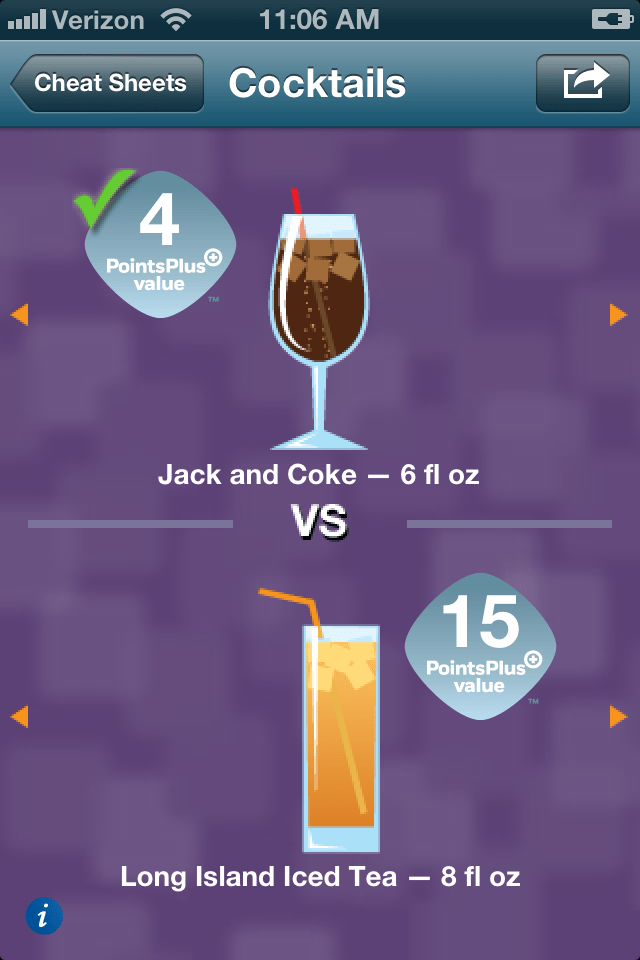
Weight Watchers' cocktail cheat sheet via its mobile app.

Weight Watchers’ cocktail cheat sheet via its mobile app.

While eTools has a ton of good info, I have to say I really enjoyed the cheat sheets. One of the hardest things to do is guestamate the points value of food when eating out. I’m not in control of how it was prepared. I’m not measuring or weighing everything. So there is a lot of guess work. The cheat sheet is a nice idea to give you a general idea of how many points you might be consuming. From a breakfast builder to happy hour foods, the cheat sheet is perfect for folks on the go. However, the mobile app version is lacking. Right now it’s limited to pizza, cockktails, pasta and salads. And some of those are limited too. I’m optimistic that WW can improve the app version.

Overall, well done Weight Watchers. There is so much on eTools that I still haven’t explored – especially the social component (which I’m looking forward too). The mobile app gets the job done. I have a few minor quibbles, but they are minor. The food tracking piece is excellence, and that is the heart of the program. If you do Weight Watchers and are not on eTools or the mobile app, I suggest you give it a try.


Loving My Walking App

So far I’m lovin’ MapMyWalk. It is very easy to use (always a good thing for an app), its FREE (bonus!) and I love that I can track what I’ve done for the week.

Screen Shot 2013-03-13 at 5.03.33 PMI’ve just been using the record function when I start my walks – no set routes. I use the voice feedback function to tell me my pace, speed and calories burned. It also provides elevation stats to boot! Granted, I’m not facing any real inclines, but I’m working up to it, I promise.

I’m going to test its Create a Map function tomorrow morning. I’ve decided to create a walk around a park nearby our house. I’m shooting for 2.5 miles tops.

Hopefully I’ll have my walking playlist set by then. Who knew choosing the right songs would be so dang hard?!?

As for my progress, my pace picked up today – I averaged 17.03 min/mi compared to 17.39 min/mi on Monday. Sweet!


MapMyWalk App

mapmywalkJust downloaded a new app to help me track my walks. MapMyWalk seems simple enough. I like that there are suggest routes as well as giving you the power to create your own routes. It also tracks goals and has challenges so it empowers you to push yourself. We’ll see about that. I plan on using it this afternoon to test it out.